
Preferencias rápidas
Os botóns de Preferencias rápidas no menú do sistema permítelle activar e desactivar servizos dispoñíbeis e escoller os dispositivos Bluetooth e redes Wifi.
Wifi
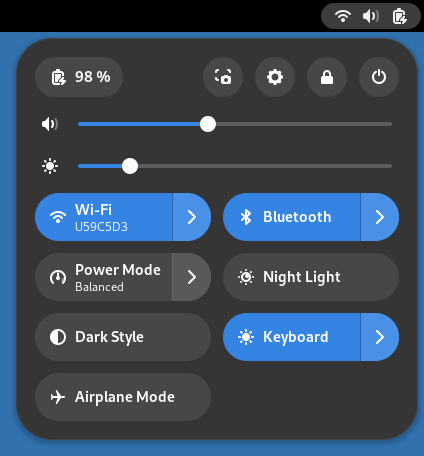
Prema o botón Wifi para apagar ou acender o Wifi.
O botón mostra a rede Wifi dispoñíbel á que está actualmente conectado.
Prema  para mostrar as redes dispoñíbeis.
Select a network to initiate a connection, or select All Networks to open the Wi-Fi settings panel.
Cableado
Press the Wired button to switch wired networking off or back
on. The button shows information about the current wired network connection.
Press
to show more settings. Select Wired Settings
to open the Network settings panel.
Bluetooth
Press the Bluetooth button to switch bluetooth off or back on.
The button shows the name of the first device, or the number of devices
connected. Press
to show paired and connected Bluetooth devices. Select one to
connect or disconnect. Select Bluetooth Settings to open the
Bluetooth settings panel.
Modo de enerxía
The Power Mode button shows the current
power mode setting. Press the button to
switch to Power Save or back to the current setting. Press
to select from all modes. Select Power Settings to
open the Power settings panel.
Troca
The other buttons show the current status of Night Light, Dark Style, Airplane Mode, or Keyboard backlight, where available. Press the button to switch on or off.
Aplicacións en segundo plano
The number of background applications running on the system is shown at the bottom of the system menu. Click to show a list of these apps. Selecting an application from the list opens a window for that app and removes it from Background Apps. Select App Settings to open the Apps settings panel.